

Setting up and maintaining RAID (Redundant Array of Independent Disks) involves moderate to high complexity and specific technical requirements depending on the RAID level chosen and hardware used. RAID requires at least two drives, with the number increasing based on the RAID type (e.g., RAID 0, 1, 5, 10).
Complexity and Technical Requirements:
-
Hardware and BIOS Configuration: RAID setup typically requires entering the BIOS/UEFI during system boot to configure SATA controller mode to RAID and create the RAID volume. This involves selecting RAID level, member disks, stripe size (e.g., 128KB default or 16KB for SSDs), and capacity. Different motherboards have varying BIOS interfaces and RAID setup utilities (e.g., Intel Rapid Storage Technology, EZ RAID).
-
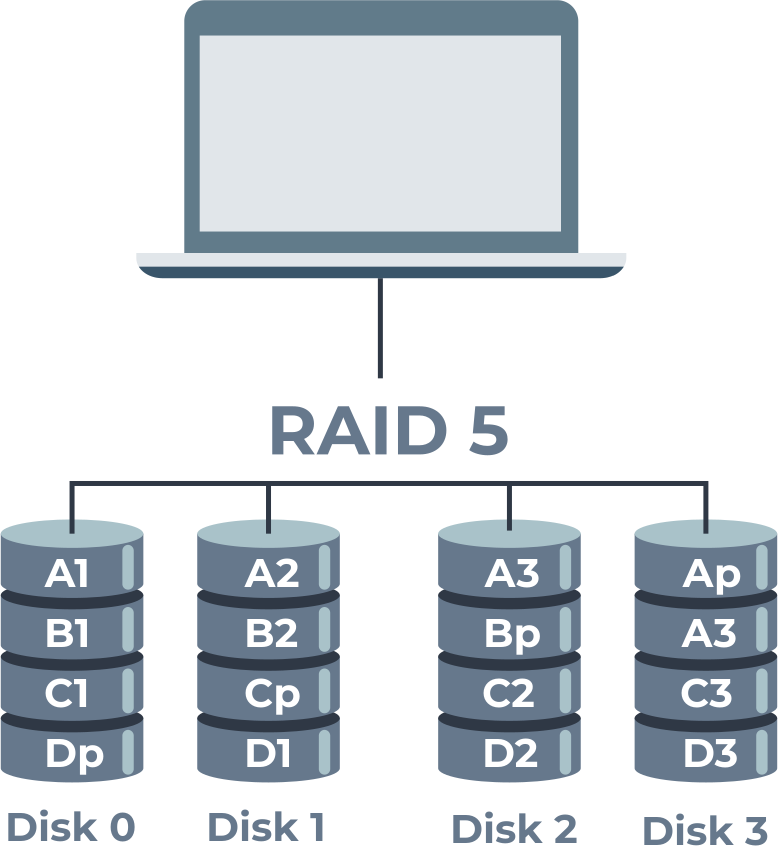
Number and Type of Drives: Using identical drives (same make, model, and capacity) is recommended for optimal performance and reliability. The minimum number of drives depends on RAID level (e.g., 2 for RAID 0/1, 3 for RAID 5, 4 for RAID 10).
-
Software vs. Hardware RAID: RAID can be configured via software tools in Windows (Disk Management for RAID 0/1, Storage Spaces for RAID 5) or via dedicated hardware RAID controllers. Hardware RAID controllers generally offer better performance and fault tolerance but add cost and complexity.
-
Data Loss Risk During Setup: Creating or deleting RAID arrays will erase all data on the involved drives, so backing up data beforehand is critical.
-
Maintenance: Regular monitoring of drive health using built-in or third-party tools is essential to detect drive failures early. RAID is not a substitute for backups; maintaining separate backups is necessary to protect against data loss.
-
Technical Skills Needed: Users should be comfortable navigating BIOS/UEFI settings, understanding RAID concepts, and performing system reboots. For advanced RAID levels (e.g., RAID 5, 10), more technical knowledge is required to manage parity and redundancy features effectively.
In summary, RAID setup and maintenance require a good understanding of hardware configuration, RAID levels, and data management practices. While basic RAID levels like 0 and 1 are simpler to set up, more complex configurations demand careful planning and technical proficiency to ensure data integrity and system performance.











Ang PH Ranking ay nag-aalok ng pinakamataas na kalidad ng mga serbisyo sa website traffic sa Pilipinas. Nagbibigay kami ng iba’t ibang uri ng serbisyo sa trapiko para sa aming mga kliyente, kabilang ang website traffic, desktop traffic, mobile traffic, Google traffic, search traffic, eCommerce traffic, YouTube traffic, at TikTok traffic. Ang aming website ay may 100% kasiyahan ng customer, kaya maaari kang bumili ng malaking dami ng SEO traffic online nang may kumpiyansa. Sa halagang 720 PHP bawat buwan, maaari mong agad pataasin ang trapiko sa website, pagandahin ang SEO performance, at pataasin ang iyong mga benta!
Nahihirapan bang pumili ng traffic package? Makipag-ugnayan sa amin, at tutulungan ka ng aming staff.
Libreng Konsultasyon